SQL Server 2022 introduced native S3 connectivity via PolyBase, letting you query CSV and Parquet files in S3 buckets using standard T-SQL. This guide walks through the full setup: installing PolyBase, configuring credentials and external data sources, creating external tables, and running federated queries that combine local SQL Server data with S3 data in a single SELECT statement. Includes troubleshooting tips, gotchas, and performance considerations.
Introduction
SQL Server 2022 quietly shipped one of the most useful features for hybrid data architectures: a native S3-compatible object storage connector for PolyBase. For the first time, you can point SQL Server directly at an S3 bucket and query CSV, Parquet, or Delta files using the same T-SQL your applications and reports already use - no ETL pipeline, no data movement, no new tools to learn.
PolyBase itself isn’t new. It debuted in SQL Server 2016 with Hadoop and Azure Blob support, then expanded in 2019 to include Oracle, Teradata, and MongoDB connectors. But the S3 connector is exclusive to SQL Server 2022 - no prior version supports it. This matters because S3 has become the de facto standard for object storage, not just on AWS but across on-premises platforms like Dell ObjectScale, MinIO, and NetApp StorageGRID that all speak the S3 API.
The practical upside: you can keep infrequently accessed data in cheap S3 storage ($0.023/GB/month) while your hot data stays on fast local SQL Server storage. End users query a view and never know the difference. SSRS reports, Power BI dashboards, and existing stored procedures all work unchanged.
This guide walks through a complete proof-of-concept: 500 rows in a local SQL Server table, 500 rows in an S3 bucket, and a single query that returns all 1,000 rows smoothly.
Infrastructure
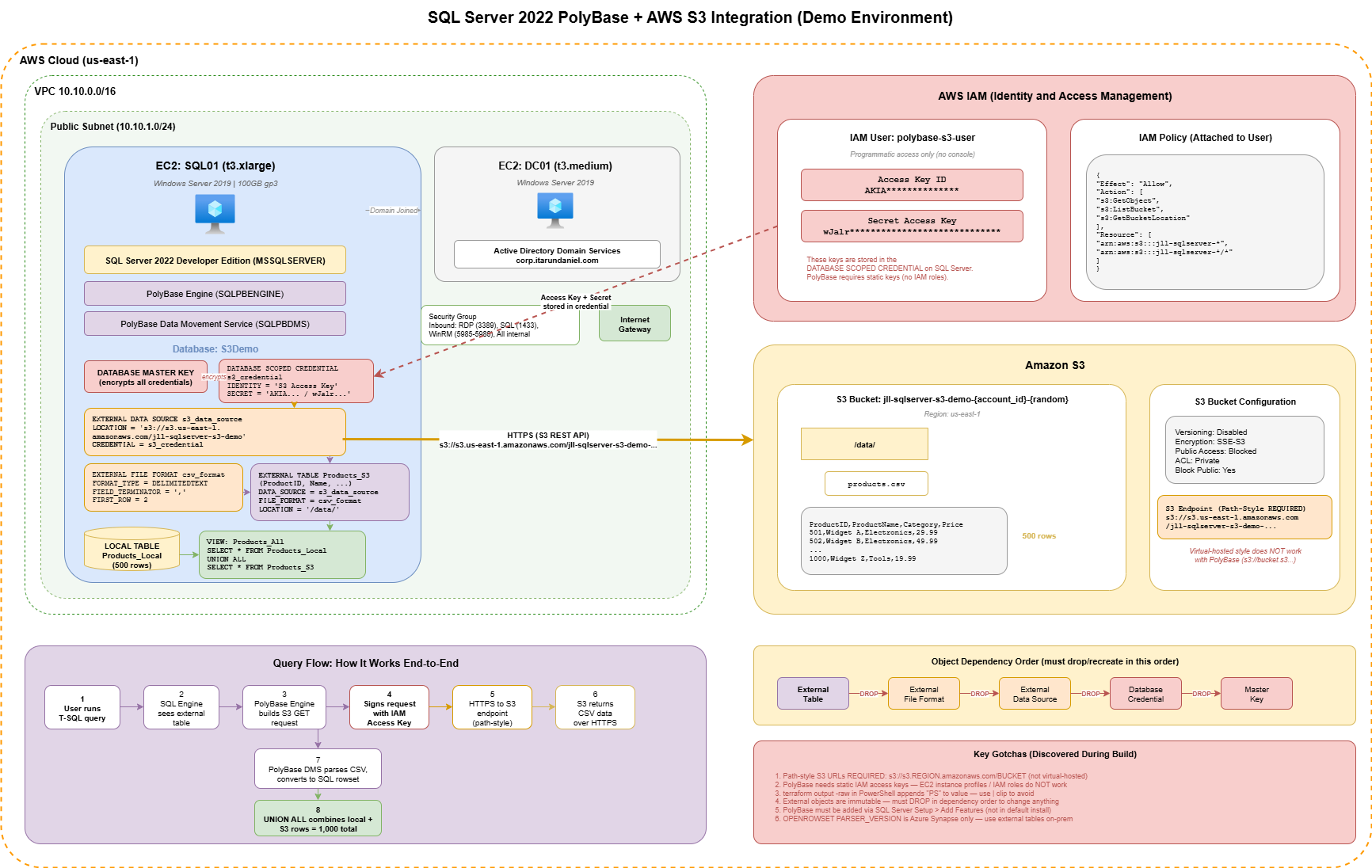
This demo runs on AWS infrastructure managed by Terraform:
- DC01 - Domain Controller (Windows Server 2019, t3.medium)
- SQL01 - SQL Server 2022 Developer Edition (Windows Server 2019, t3.xlarge, 100GB gp3)
- S3 Bucket - With IAM user for PolyBase credentials
- Ansible - Handles domain join and initial configuration
Prerequisites
- SQL Server 2022 (Developer or Enterprise edition)
- PolyBase feature installed (added via SQL Server Setup > Add Features)
- AWS Account with S3 access
- IAM credentials (Access Key ID + Secret Access Key)
- SSMS or Azure Data Studio
Part 1: SQL Server Setup
1.1 Install PolyBase Feature
PolyBase is NOT included in the default SQL Server installation. You must add it separately:
- RDP into SQL01
- Run the SQL Server 2022 installer
- Choose Add features to an existing instance of SQL Server 2022
- Select PolyBase Query Service for External Data
- Accept the default PolyBase port range (
16450-16460) - Complete the wizard and reboot when prompted
1.2 Verify PolyBase Installation
-- Check if PolyBase is installed
SELECT SERVERPROPERTY('IsPolyBaseInstalled') AS IsPolyBaseInstalled;
-- Returns 1 if installed, 0 if not
1.3 Enable PolyBase
-- Enable PolyBase export (required for S3 integration)
EXEC sp_configure 'polybase enabled', 1;
RECONFIGURE;

-- Enable advanced options and allow polybase export
EXEC sp_configure 'show advanced options', 1;
RECONFIGURE;

EXEC sp_configure 'allow polybase export', 1;
RECONFIGURE;
1.4 Restart SQL Server Services
After enabling PolyBase, restart SQL Server. This automatically restarts the PolyBase services too.
# PowerShell (Run as Administrator)
# Restarting MSSQLSERVER also restarts the dependent PolyBase services
Restart-Service -Name "MSSQLSERVER" -ForceThe PolyBase service names may differ from the documentation. Use Get-Service | Where-Object { $_.Name -like "*SQL*" -or $_.Name -like "*Poly*" } to find the actual service names on your instance.
Common service names:
MSSQLSERVER- SQL ServerSQLPBENGINE- SQL Server PolyBase EngineSQLPBDMS- SQL Server PolyBase Data Movement
1.5 Verify Services Are Running
Get-Service | Where-Object { $_.Name -like "*SQL*" -or $_.Name -like "*Poly*" }
# Confirm MSSQLSERVER, SQLPBENGINE, and SQLPBDMS are all Running
Part 2: Create Demo Database and Local Table
2.1 Create Database
-- Create demo database
CREATE DATABASE S3IntegrationDemo;
GO

USE S3IntegrationDemo;
GO
2.2 Create Local Table with Sample Data (500 rows)
CREATE TABLE dbo.Products_Local (
    ProductID INT PRIMARY KEY,
    ProductName NVARCHAR(100),
    Category NVARCHAR(50),
    Price DECIMAL(10,2),
    StockQuantity INT,
    StorageLocation NVARCHAR(20) DEFAULT 'SQL Server'
);
-- Then bulk-insert 500 rows. I generated them using ROW_NUMBER()
-- over sys.all_objects CROSS JOIN sys.all_objects to get a quick
-- 500-row sequence, with CASE to round-robin categories and RAND()
-- for prices and stock.
Part 3: Prepare S3 Data
3.1 Generate CSV File for S3 (500 rows)
Create a CSV file with rows 501-1000 to upload to S3.
I generated the CSV by running a SELECT that produces rows 501-1000 (same column shape, StorageLocation = 'S3 Bucket'), then exported the result set to CSV from SSMS via "Results to File". You can use any approach that gets you a CSV with a header row.
Alternative: PowerShell script to generate CSV
If you prefer PowerShell, a quick loop building [PSCustomObject] rows piped to Export-Csv -NoTypeInformation does the same job in about ten lines. The point is just to get 500 rows of test data into S3.
3.2 Upload to S3
# Using AWS CLI
aws s3 cp C:\temp\products_s3.csv s3://your-bucket-name/data/products_s3.csv
Or upload via the AWS Console: navigate to your bucket, create a data/ folder, and upload products_s3.csv.
Part 4: Configure SQL Server to Access S3
4.1 Create Master Key
The master key is a database-level encryption key that protects other secrets stored in the database. The database scoped credential’s secret (your AWS access keys) is encrypted by this master key. Think of it as a “key that locks the safe where your passwords are kept.”
USE S3IntegrationDemo;
GO

-- Create master key (required for credentials)
CREATE MASTER KEY ENCRYPTION BY PASSWORD = 'YourStr0ng!Passw0rd#2024';
GO
4.2 Create Database Scoped Credential
A stored set of credentials that lives inside a specific database. SQL Server uses it when connecting to external systems (like S3) on your behalf.
-- Create credential for S3 access
-- Replace with your actual IAM access key values
CREATE DATABASE SCOPED CREDENTIAL S3Credential
WITH IDENTITY = 'S3 Access Key',
SECRET = '<AccessKeyID>:<SecretAccessKey>';
GO

-- Example format (DO NOT use in production):
-- SECRET = 'AKIAIOSFODNN7EXAMPLE:wJalrXUtnFEMI/K7MDENG/bPxRfiCYEXAMPLEKEY';PolyBase requires explicit static IAM access keys. It does not support EC2 instance profiles or IAM roles for authentication. You need a dedicated IAM user with programmatic access. The SECRET format is AccessKeyID:SecretAccessKey with a colon separator.
4.3 Create External Data Source
PolyBase requires path-style S3 URLs. Virtual-hosted style and short-form bucket names do not work.
-- Path-style URL (WORKING - use this)
CREATE EXTERNAL DATA SOURCE S3DataSource
WITH (
    LOCATION = 's3://s3.us-east-1.amazonaws.com/your-bucket-name',
    CREDENTIAL = S3Credential
);
GO
Do NOT use virtual-hosted style - PolyBase does not support it:
-- Virtual-hosted style (DOES NOT WORK with PolyBase)
-- LOCATION = 's3://your-bucket-name.s3.us-east-1.amazonaws.com/'

-- Short form (DOES NOT WORK with PolyBase)
-- LOCATION = 's3://your-bucket-name/'
4.4 Create External File Format
-- Create file format for CSV files
CREATE EXTERNAL FILE FORMAT CSVFormat
WITH (
    FORMAT_TYPE = DELIMITEDTEXT,
    FORMAT_OPTIONS (
        FIELD_TERMINATOR = ',',
        STRING_DELIMITER = '"',
        FIRST_ROW = 2,  -- Skip header row
        USE_TYPE_DEFAULT = TRUE
    )
);
GO
4.5 Create External Table
-- Create external table pointing to S3 data
CREATE EXTERNAL TABLE dbo.Products_S3 (
    ProductID INT,
    ProductName NVARCHAR(100),
    Category NVARCHAR(50),
    Price DECIMAL(10,2),
    StockQuantity INT,
    StorageLocation NVARCHAR(20)
)
WITH (
    LOCATION = '/data/',
    DATA_SOURCE = S3DataSource,
    FILE_FORMAT = CSVFormat
);
GO
Part 5: Demo Queries
5.1 Query S3 Data Only
-- Query data from S3 bucket
SELECT * FROM dbo.Products_S3;

-- Count rows in S3
SELECT COUNT(*) AS S3RowCount FROM dbo.Products_S3;
5.2 Query Local Data Only
-- Query data from local SQL Server table
SELECT * FROM dbo.Products_Local;

-- Count rows in local table
SELECT COUNT(*) AS LocalRowCount FROM dbo.Products_Local;
5.3 Combined Query - The Federated Query
This is the key demo: a single SELECT statement that returns data from both SQL Server and S3.
-- SINGLE QUERY RETURNING DATA FROM BOTH
-- SQL SERVER AND S3 BUCKET
SELECT
    ProductID,
    ProductName,
    Category,
    Price,
    StockQuantity,
    StorageLocation
FROM dbo.Products_Local

UNION ALL

SELECT
    ProductID,
    ProductName,
    Category,
    Price,
    StockQuantity,
    StorageLocation
FROM dbo.Products_S3
ORDER BY ProductID;

-- Total count should be ~1000 rows
5.4 Aggregation Across Both Sources
-- Category summary across both SQL Server and S3
SELECT
    Category,
    COUNT(*) AS ProductCount,
    AVG(Price) AS AvgPrice,
    SUM(StockQuantity) AS TotalStock
FROM (
    SELECT Category, Price, StockQuantity FROM dbo.Products_Local
    UNION ALL
    SELECT Category, Price, StockQuantity FROM dbo.Products_S3
) AS AllProducts
GROUP BY Category
ORDER BY ProductCount DESC;
5.5 Create a View for Smooth Access
-- Create a view that combines both data sources
CREATE VIEW dbo.Products_All AS
SELECT
    ProductID,
    ProductName,
    Category,
    Price,
    StockQuantity,
    StorageLocation
FROM dbo.Products_Local
UNION ALL
SELECT
    ProductID,
    ProductName,
    Category,
    Price,
    StockQuantity,
    StorageLocation
FROM dbo.Products_S3;
GO

-- Now users can query as if it's a single table
SELECT * FROM dbo.Products_All WHERE Category = 'Electronics';
SELECT COUNT(*) FROM dbo.Products_All;
Supported File Formats
| Format Type | Description |
|---|---|
DELIMITEDTEXT |
CSV files (used in this demo) |
PARQUET |
Columnar format - compressed, fast for analytics, supports predicate pushdown |
DELTA |
Delta Lake format (versioned Parquet with transaction logs, read-only) |
JSON |
JSON files (SQL Server 2022+) |
Parquet is the recommended format for production. It’s significantly smaller, faster to query, and supports column pruning and predicate pushdown - S3 only returns the data SQL Server needs, reducing transfer costs.
Verifying Your Configuration
-- View external data source settings
SELECT name, location FROM sys.external_data_sources;

-- View external tables
SELECT name, data_source_id, location FROM sys.external_tables;

-- View file formats
SELECT name, format_type FROM sys.external_file_formats;
Modifying External Objects
External objects are immutable - you cannot ALTER them. They must be dropped and recreated in dependency order.
Drop Order (dependencies first)
-- Must drop in this order: Table -> File Format -> Data Source -> Credential
DROP EXTERNAL TABLE dbo.Products_S3;
DROP EXTERNAL FILE FORMAT CSVFormat;
DROP EXTERNAL DATA SOURCE S3DataSource;
DROP DATABASE SCOPED CREDENTIAL S3Credential;
GO
Recreate (reverse order)
Then recreate in reverse order: credential first, then data source, then file format, then external table. The CREATE statements are identical to the ones in sections 4.2 through 4.5 above. There's no shortcut, no ALTER, you do the full chain every time.
Cleanup
USE S3IntegrationDemo;
GO

-- Drop external objects (must be done in order)
DROP EXTERNAL TABLE IF EXISTS dbo.Products_S3;
DROP EXTERNAL FILE FORMAT IF EXISTS CSVFormat;
DROP EXTERNAL DATA SOURCE IF EXISTS S3DataSource;
DROP DATABASE SCOPED CREDENTIAL IF EXISTS S3Credential;
DROP MASTER KEY;

-- Drop local objects
DROP VIEW IF EXISTS dbo.Products_All;
DROP TABLE IF EXISTS dbo.Products_Local;
GO

-- Drop database
USE master;
GO
DROP DATABASE IF EXISTS S3IntegrationDemo;
GO
# Delete S3 bucket and contents
aws s3 rb s3://your-bucket-name --forceTroubleshooting
| Issue | Solution |
|---|---|
PolyBase feature is not installed |
Re-run SQL Server Setup > Add Features > select PolyBase |
content of directory cannot be listed |
Use path-style S3 URL: s3://s3.us-east-1.amazonaws.com/bucket-name |
| Virtual-hosted URL not working | PolyBase requires path-style: s3://s3.REGION.amazonaws.com/BUCKET NOT s3://BUCKET.s3.REGION.amazonaws.com/ |
SignatureDoesNotMatch on S3 |
Secret key was copied incorrectly - regenerate or re-copy the IAM access key |
| PolyBase services not starting | Ensure SQL Server 2022 is properly licensed (Developer/Enterprise) |
| S3 connection timeout | Check DNS resolution and outbound HTTPS (port 443) from SQL Server |
| Access denied to S3 | Verify IAM credentials have s3:GetObject and s3:ListBucket permissions |
| CSV parsing errors | Ensure FIRST_ROW is set correctly, check for special characters |
| Cannot drop credential | Drop objects in order: External Table → File Format → Data Source → Credential |
Check PolyBase Logs
PolyBase logs are located in the SQL Server log directory:
# Find PolyBase log directory
Get-ChildItem "C:\Program Files\Microsoft SQL Server" -Recurse -Filter "Polybase" -Directory

# View the latest PolyBase log entries
Get-ChildItem "C:\Program Files\Microsoft SQL Server\MSSQL16.MSSQLSERVER\MSSQL\Log\Polybase\" -Recurse -Filter "*.log" | Sort-Object LastWriteTime -Descending | Select-Object -First 3 | ForEach-Object { Write-Host "=== $($_.Name) ===" ; Get-Content $_.FullName -Tail 50 }
Key log files:
*_DWEngine_errors.log- PolyBase engine errors*_DWEngine_server.log- PolyBase server activity*_DWEngine_movement.log- Data movement activity
Test S3 Connectivity
# Test DNS resolution to S3
Resolve-DnsName s3.us-east-1.amazonaws.com

# Test HTTPS connectivity to S3
Test-NetConnection -ComputerName s3.us-east-1.amazonaws.com -Port 443
IAM Policy Required
The IAM user attached to the credential needs s3:GetObject and s3:ListBucket on the bucket ARN and bucket/*. That's the minimum. If you want PolyBase to also write via CETAS, add s3:PutObject.
Gotchas and Things to Be Aware Of
S3 URL Format
- Must use path-style URLs -
s3://s3.REGION.amazonaws.com/BUCKETnots3://BUCKET.s3.REGION.amazonaws.com/ - Virtual-hosted style and short-form bucket names do not work with PolyBase
- The S3 bucket region in the URL must match the actual bucket region
Credentials and Security
- No instance profile support - PolyBase requires static IAM access keys, not EC2 IAM roles
- Key rotation is entirely manual - If you rotate IAM keys, you must drop and recreate the entire chain (table → data source → credential) since you can’t ALTER them
- Static keys don’t expire - Unlike IAM roles with temporary credentials, access keys last until rotated. Set a reminder
- Credentials are stored encrypted but accessible to DB admins - Anyone with
CONTROLpermission on the database can use the credential
External Objects Are Immutable
- No ALTER statements - You cannot modify external tables, data sources, credentials, or file formats in place
- Must drop and recreate in dependency order - Table first, then format, then data source, then credential
- Recreate in reverse order - Credential first, then data source, then format, then table
Performance
- Every query hits S3 - There is no caching. Each
SELECT * FROM Products_S3makes live API calls to S3 - No indexes on external tables - Filters on CSV data are applied after fetching, not pushed to S3. Parquet supports predicate pushdown
- CSV is the slowest format - Parquet is significantly faster and cheaper (less data transferred, column pruning)
- Large files = slow queries - PolyBase doesn’t parallelize well on a single large file. Many smaller files (~100MB each) perform better than one giant file
- JOINs are not pushed down - If you join a local table with an external table, SQL Server fetches ALL the S3 data first, then joins locally
- PolyBase services consume RAM even when idle - The engine and data movement services grab memory at startup
Data Integrity
- No schema enforcement on the S3 side - If someone changes the CSV structure in S3, your external table breaks silently or returns garbage
- Type mismatches fail the entire query - One bad row in the CSV (e.g., text in an INT column) kills the whole SELECT, not just that row
- NVARCHAR length matters - If your CSV has a value longer than your defined column width (e.g.,
NVARCHAR(100)), the query fails - Empty lines in CSV cause issues - A trailing newline at the end of the file can create a phantom row with NULLs
- Encoding matters - PolyBase expects UTF-8. UTF-16 or BOM-encoded files cause parsing errors
Network and DNS
- Outbound HTTPS (port 443) required - Private subnets need a NAT gateway or S3 VPC endpoint
- DNS must resolve S3 endpoints - Domain-joined servers using the DC as primary DNS need a forwarder configured
- PolyBase error messages are vague - “content of directory cannot be listed” can mean wrong URL format, bad credentials, wrong region, no files, or network issues. Always check the PolyBase logs first
Cost
- S3 GET requests cost $0.0004 per 1,000 - Sounds cheap, but a PolyBase query does LIST + multiple GETs. Dashboards auto-refreshing add up fast
- Data transfer fees - Cross-AZ transfer between EC2 and S3 costs money. Use a VPC endpoint to avoid this
Availability
- If S3 is down, queries fail - No fallback. Any view or stored procedure that touches the external table errors out
- If PolyBase services crash, SQL Server keeps running - But external table queries silently fail. Monitor
SQLPBENGINEandSQLPBDMS - Windows Updates can restart services - PolyBase services may not auto-start after a reboot if auto-start is disabled
- No transactions - External tables don’t participate in SQL Server transactions. You cannot rollback a query against S3
S3 VPC Endpoint Recommendation
For production, use a VPC Gateway Endpoint for S3 instead of routing traffic over the internet:
- Free - No hourly cost or data processing charges (vs NAT gateway at ~$32/month + $0.045/GB)
- Lower latency - Traffic stays on AWS backbone
- More secure - S3 traffic never touches the public internet
- You can attach a VPC endpoint policy to restrict which buckets are accessible
When to Use PolyBase + S3
Good Use Cases
- Data lake integration - Query archived or cold data in S3 alongside hot data in SQL Server without importing
- Regulatory/compliance - Keep immutable records in S3, query them from SQL Server as needed
- Hybrid reporting - Combine on-premises SQL data with cloud-stored data in a single view for BI tools
- Cost optimization - Move infrequently accessed data to cheap S3 storage ($0.023/GB/month), keep expensive SQL Server storage for active data only
- Data migration - Gradually move workloads to S3 while maintaining SQL Server query compatibility for existing applications
- ETL staging - Use S3 as a landing zone for data from external systems, query it directly or load selectively into SQL Server
Not a Good Fit
- High-frequency transactional queries - PolyBase is for occasional federated/analytical queries, not OLTP workloads
- Real-time data - S3 data is only as fresh as the last upload. There’s no change data capture or streaming
- Large-scale analytics at terabyte scale - If you’re scanning terabytes in S3 frequently, consider AWS Athena or Redshift Spectrum
- Write-heavy workloads - PolyBase S3 is read-only for external tables (CETAS can write, but it’s export-only)
S3-Compatible Storage
The SQL Server 2022 PolyBase S3 connector works with any S3-compatible storage, not just AWS S3. The only thing that changes is the LOCATION URL in CREATE EXTERNAL DATA SOURCE:
-- AWS S3
CREATE EXTERNAL DATA SOURCE AwsS3
WITH (
    LOCATION = 's3://s3.us-east-1.amazonaws.com/my-bucket',
    CREDENTIAL = S3Credential
);

-- MinIO (on-premises)
CREATE EXTERNAL DATA SOURCE MinioS3
WITH (
    LOCATION = 's3://minio.internal.corp:9000/my-bucket',
    CREDENTIAL = MinioCredential
);

-- Dell ObjectScale (on-premises)
CREATE EXTERNAL DATA SOURCE ObjectScaleS3
WITH (
    LOCATION = 's3://objectscale.corp.local:9021/my-bucket',
    CREDENTIAL = ObjectScaleCredential
);
Same SQL. Same PolyBase. Same credential pattern. Just a different endpoint URL.
Conclusion
SQL Server 2022’s PolyBase S3 connector bridges the gap between traditional relational databases and modern object storage. By virtualizing S3 data through external tables and views, you get the best of both worlds: SQL Server’s query engine and security model for your hot data, and S3’s massive, cheap storage for everything else.
The key takeaways:
- S3 support is new in SQL Server 2022 - No prior version supports it
- Path-style S3 URLs are mandatory - Virtual-hosted style does not work
- Static IAM keys are required - No instance profile or IAM role support
- External objects are immutable - Drop and recreate in dependency order
- Use Parquet over CSV - Better performance, smaller transfers, predicate pushdown
- Works with any S3-compatible storage - AWS S3, MinIO, Dell ObjectScale, NetApp StorageGRID
- Use a VPC endpoint in production - Free, faster, more secure than NAT gateway
Start with a small proof-of-concept like this demo, validate the query patterns against your real workloads, and expand from there.
Want Help With This?
If you're working on something similar and want a second set of eyes, or you'd like to talk through how this applies to your environment, reach out via the contact form. Happy to help.