This post walks through a production implementation of centralized network inspection using Palo Alto VM-Series firewalls, AWS Gateway Load Balancer (GWLB), and Transit Gateway in a hub-and-spoke architecture. All traffic - North-South (internet-bound) and East-West (inter-VPC and VPN) - passes through a dedicated inspection VPC with dual GWLB endpoints, managed entirely with Terraform. Includes a deep dive on cross-zone load balancing - when to enable it, when to disable it, and how it interacts with TGW appliance mode for stateful firewall inspection.
The Challenge
When an enterprise operates dozens of AWS accounts across multiple regions, every packet that crosses a VPC boundary becomes a security question. How do you ensure that all traffic - spoke-to-internet, spoke-to-spoke, and on-premises-to-spoke - passes through a newer firewall without creating a routing nightmare?
This post walks through a production implementation of centralized network inspection using Palo Alto VM-Series firewalls, AWS Gateway Load Balancer (GWLB), and AWS Transit Gateway (TGW) - all managed with Terraform. The architecture inspects both North-South (internet-bound) and East-West (inter-VPC and VPN) traffic through a single, dedicated inspection VPC.
Architecture Overview
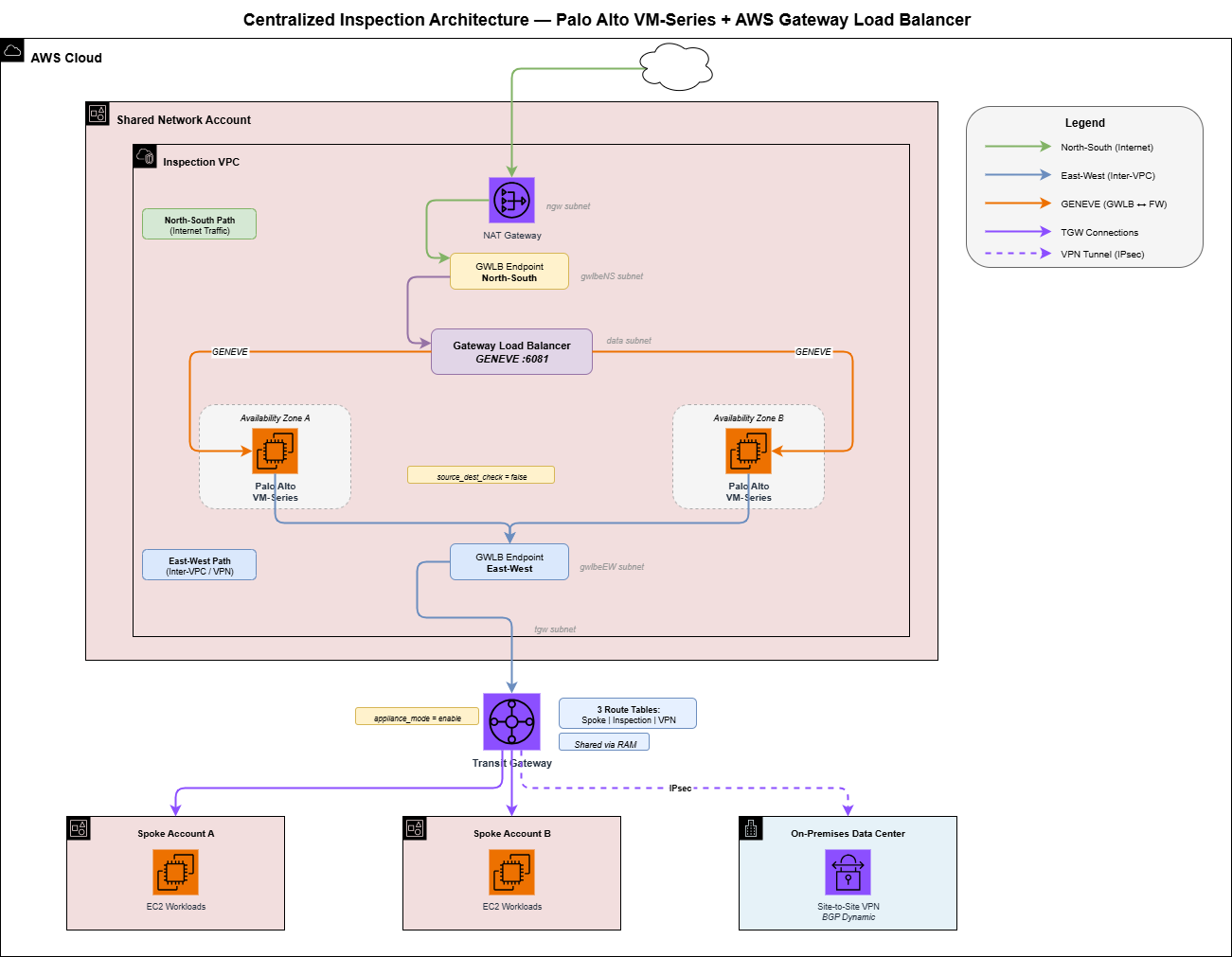
The design follows a hub-and-spoke model:
- Hub: A dedicated inspection VPC in a shared network account hosts Palo Alto VM-Series firewalls behind a Gateway Load Balancer.
- Spokes: Multiple workload VPCs, each in its own AWS account, connect to the hub via a Transit Gateway shared through AWS Resource Access Manager (RAM).
- On-Premises: Data center locations connect via Site-to-Site VPN with BGP dynamic routing.
All traffic flows through the inspection VPC before reaching its destination. No exceptions.
The Inspection VPC: Six Subnet Types, Two AZs
The inspection VPC is the most precisely engineered VPC in the environment. It uses six purpose-built subnet types, each deployed across two availability zones:
| Subnet | Purpose | Default Route |
|---|---|---|
| mgmt | Palo Alto management interfaces | Internet Gateway |
| data | GWLB target group (firewall data plane) | None (GENEVE traffic) |
| ngw | NAT Gateways for outbound internet | Internet Gateway |
| tgw | Transit Gateway attachment | GWLB Endpoint (NS) |
| gwlbeNS | GWLB Endpoints for North-South inspection | NAT Gateway |
| gwlbeEW | GWLB Endpoints for East-West inspection | None (returns to TGW) |
The critical insight is that routing drives the inspection model. The TGW subnets default-route to the North-South GWLB endpoint, but override with specific routes to the East-West GWLB endpoint for RFC1918 (private) traffic. This separation prevents hairpin routing and ensures each traffic flow takes the correct inspection path.
Defining the Subnet Layout in Terraform
Each subnet is created through a reusable module that accepts a default route (for 0.0.0.0/0) and a map of additional routes. The TGW subnet's default route points to the North-South GWLB endpoint, and the additional routes loop over local.local_spoke_cidrs, local.remote_spoke_cidrs, and local.onprem_cidrs, sending each one to the East-West GWLB endpoint. The shape is something like:
module "subnet_tgw_1a" {
  source        = "../../modules/subnet"
  default_route = { vpc_endpoint_id = module.vpc_endpoints.endpoint_ids["gwlbe-NS-a"] }

  additional_routes = { for cidr in local.private_cidrs : cidr =>
    { vpc_endpoint_id = module.vpc_endpoints.endpoint_ids["gwlbe-EW-a"] }
  }
}
That split is the heart of the dual-path model: 0.0.0.0/0 to the NS endpoint, every known private CIDR to the EW endpoint. Gotcha worth flagging: the EW additional_routes must cover local spokes, remote spokes via TGW peering, and on-prem CIDRs - miss any one and that traffic hairpins through NAT.
Centralized Spoke CIDR Management
With many spoke VPCs per region, manually maintaining route tables would be error-prone. Instead, all spoke CIDRs live in a single YAML file that every routing decision references:
# config/spoke_cidrs.yaml

onprem:
  - 10.0.0.0/8

regions:
  us-east-1:
    - 10.100.0.0/20
    - 10.100.16.0/20
    - 10.100.32.0/20
    - 10.101.0.0/20
    - 10.101.16.0/20
    # ... one entry per spoke VPC
  us-east-2:
    - 10.200.0.0/20
    - 10.200.16.0/20
    # ... mirrored DR region CIDRs
A locals block reads the YAML with yamldecode(file(...)) and splits it into local_spoke_cidrs, remote_spoke_cidrs, and onprem_cidrs. From there every route table, TGW route, and firewall policy references those locals via for expressions. Adding a new spoke VPC is a one-line YAML change. Every route table across the entire environment updates on the next terraform apply.
Gateway Load Balancer: The GENEVE Backbone
AWS Gateway Load Balancer is the service that makes transparent inline inspection possible. Unlike a traditional load balancer that terminates connections, GWLB uses GENEVE encapsulation (port 6081) to tunnel the original packet to the firewall and back, preserving source and destination IPs.
The GWLB Module
The module wires together four resources: an aws_lb with load_balancer_type = "gateway", an aws_lb_target_group with protocol = "GENEVE" on port 6081 plus a target_failover block, a listener, and an aws_vpc_endpoint_service with gateway_load_balancer_arns set. The GWLB deploys into the data subnets alongside the firewall data-plane interfaces, cross-zone load balancing is on for HA, and TCP idle timeout is bumped to 3600s for long-lived connections.
GWLB Endpoints: Separating North-South from East-West
A single GWLB can serve multiple VPC endpoints, and this is where the dual-path architecture comes together. Four GWLB endpoints are created - two for North-South traffic and two for East-West - each in its own dedicated subnet:
The caller passes an endpoints map with four keys (gwlbe-NS-a/b, gwlbe-EW-a/b), each pointing at its dedicated subnet. The underlying module is just a for_each over that map creating aws_vpc_endpoint resources with vpc_endpoint_type = "GatewayLoadBalancer".
Why Separate Endpoints?
The separation is about return routing. After the GWLB inspects a packet, it returns it to the same GWLB endpoint that sent it. The route table on that endpoint's subnet determines where the packet goes next:
- NS endpoint subnet: Default route to NAT Gateway (for internet egress), specific routes back to TGW (for return traffic to spokes).
- EW endpoint subnet: All routes point back to TGW (no internet path needed).
If you used a single endpoint for both flows, you couldn't have different next-hops for internet-bound vs. inter-VPC return traffic.
North-South Endpoint Routing
The NS endpoint subnet's default route points at the NAT Gateway in its AZ (post-inspection internet egress), and additional routes for every local spoke and on-prem CIDR send return traffic back to the TGW. Same subnet module pattern as the TGW subnet, just inverted: 0.0.0.0/0 to NAT, private CIDRs to TGW.
Palo Alto VM-Series Firewalls
Two Palo Alto VM-Series instances run in an active-active configuration, one per AZ. Each firewall has two network interfaces:
- Data interface (eth0): In the data subnet, receives GENEVE-encapsulated traffic from GWLB. Source/dest check is disabled - critical for inline inspection.
- Management interface (eth1): In the management subnet, used for SSH/HTTPS administration. Gets an Elastic IP for remote access.
The Firewall Module
The module creates two ENIs (data + mgmt), an EIP on the mgmt ENI, the aws_instance with both ENIs attached (data on device_index 0, mgmt on 1), and an aws_lb_target_group_attachment registering the instance with the GWLB target group on port 6081.
The two settings you cannot get wrong:
resource "aws_network_interface" "firewall_data" {
  source_dest_check = false   # required for inline inspection
}

resource "aws_instance" "firewall" {
  user_data = <<-EOF
    mgmt-interface-swap=enable
    plugin-op-commands=aws-gwlb-inspect:enable
  EOF
}
Forget source_dest_check = false and packets silently disappear into the void. Forget the user_data bootstrap and the Palo never registers as healthy with GWLB.
Key Configuration Details
Instance Type: c5n.9xlarge - The c5n family is network-optimized with enhanced networking (ENA), providing up to 50 Gbps of bandwidth. For a firewall processing every packet in a multi-account environment, network throughput is the bottleneck.
The compute layer instantiates the firewall module twice, once per AZ, pulling subnet IDs, security groups, key pair, and GWLB target group ARN from remote state in the networking and security layers.
Transit Gateway: The Routing Brain
The Transit Gateway is the backbone that connects every spoke VPC, the inspection VPC, and the VPN tunnels. It uses three custom route tables to enforce inspection:
| Route Table | Associated With | Routing Logic |
|---|---|---|
| Spoke | All spoke VPC attachments | Default 0.0.0.0/0 to inspection VPC |
| Inspection | Inspection VPC attachment | Propagated routes back to spokes |
| VPN | VPN attachments | All spoke CIDRs to inspection VPC |
Transit Gateway Module
The module bundles five resources: the TGW itself, the inspection VPC attachment (with appliance_mode_support = "enable" - more on that in a moment), a for_each over a route-table map, a for_each over a route map, and one over propagations. Both default association and propagation are disabled so routing is explicit.
The caller defines three route tables (spoke, inspection, vpn) and wires routes per table:
- spoke: 0.0.0.0/0 to the inspection VPC attachment - one route, everything else goes through inspection.
- vpn: a
forloop overlocal.local_spoke_cidrsandlocal.remote_spoke_cidrs, each CIDR pointing to the inspection VPC attachment. - inspection: propagations from every spoke attachment, so return traffic finds the right destination.
Why Appliance Mode Matters
The appliance_mode_support = "enable" setting on the inspection VPC attachment is non-negotiable. Without it, TGW can return traffic through a different AZ than the one it entered, breaking stateful firewall inspection. With appliance mode, TGW ensures symmetric routing - traffic always returns through the same AZ it entered.
Sharing the TGW Across the Organization
The TGW is created in the shared network account but needs to be accessible from all spoke accounts. AWS Resource Access Manager (RAM) handles this:
Three resources do it: aws_ram_resource_share with allow_external_principals = false, aws_ram_resource_association binding the TGW ARN to the share, and aws_ram_principal_association targeting the AWS Organization ARN.
The RAM principal is the AWS Organization ARN, which means every account in the org can see and attach to the TGW. When a spoke account creates a TGW attachment, it's automatically associated with the spoke route table and its CIDRs are propagated to the inspection route table - zero manual intervention.
GWLB Endpoint Service Permissions
For spoke accounts to create GWLB endpoints that reference the centralized GWLB, each account principal must be explicitly allowed on the VPC Endpoint Service. This is automated by reading all account IDs from a centralized config file and generating IAM root ARNs:
A locals block reads accounts.yaml, builds arn:aws:iam::<id>:root strings, and a for_each over the set creates one aws_vpc_endpoint_service_allowed_principal per account.
This means adding a new spoke account is a one-line config change - the GWLB endpoint service permissions update automatically.
VPN Integration: On-Premises Inspection
On-premises locations connect via Site-to-Site VPN with dynamic BGP routing. Pre-shared keys are stored securely in AWS Secrets Manager:
Each customer gateway gets a Secrets Manager secret for its PSK, then an aws_vpn_connection attached to the TGW with static_routes_only = false for BGP, pulling both tunnel PSKs from the secret version.
VPN attachments are associated with the VPN route table, which has explicit routes for every spoke CIDR pointing to the inspection VPC. This means on-premises traffic destined for any spoke VPC must transit through the Palo Alto firewalls.
BGP propagation runs in the opposite direction: spoke VPC CIDRs are propagated to the VPN route table, which advertises them back to on-premises routers. This ensures on-premises devices always have up-to-date routes to AWS spoke VPCs.
This is a for expression over every spoke VPC attachment ID, producing a propagation entry against the vpn route table key.
Traffic Flow Deep Dive
North-South: Spoke to Internet
1. EC2 in spoke VPC sends packet to 8.8.8.8
2. Spoke VPC route table: 0.0.0.0/0 -> TGW
3. TGW spoke route table: 0.0.0.0/0 -> inspection VPC attachment
4. Inspection VPC TGW subnet: 0.0.0.0/0 -> gwlbe-NS (GWLB endpoint)
5. GWLB encapsulates in GENEVE -> Palo Alto inspects -> GWLB returns
6. gwlbeNS subnet: 0.0.0.0/0 -> NAT Gateway
7. NAT Gateway -> Internet Gateway -> Internet
Return path: Internet → NAT Gateway → NGW subnet routes spoke CIDRs to gwlbe-NS → GWLB inspects → gwlbeNS subnet routes spoke CIDRs to TGW → TGW inspection table routes to spoke attachment → Spoke VPC.
East-West: Spoke A to Spoke B
1. EC2 in Spoke A (10.100.0.0/20) sends packet to Spoke B (10.100.16.0/20)
2. Spoke A route table: 0.0.0.0/0 -> TGW
3. TGW spoke route table: 0.0.0.0/0 -> inspection VPC attachment
4. Inspection VPC TGW subnet: 10.100.16.0/20 -> gwlbe-EW (GWLB endpoint)
5. GWLB encapsulates in GENEVE -> Palo Alto inspects -> GWLB returns
6. gwlbeEW subnet: 10.100.16.0/20 -> TGW
7. TGW inspection route table: 10.100.16.0/20 -> Spoke B attachment
8. Packet arrives at Spoke B
VPN: On-Premises to Spoke
1. On-prem server (10.1.2.3) sends packet to Spoke VPC (10.100.0.50)
2. On-prem router -> IPsec VPN tunnel -> TGW
3. TGW VPN route table: 10.100.0.0/20 -> inspection VPC attachment
4. Inspection VPC TGW subnet: 10.100.0.0/20 -> gwlbe-EW (East-West endpoint)
5. GWLB encapsulates in GENEVE -> Palo Alto inspects -> GWLB returns
6. gwlbeEW subnet: 10.100.0.0/20 -> TGW
7. TGW inspection route table: 10.100.0.0/20 -> Spoke attachment
8. Packet arrives at spoke VPC
Cross-Region: TGW Peering
The architecture spans two regions with TGW peering for cross-region traffic. Remote spoke CIDRs in the inspection route table point to the peering attachment:
A for expression over local.remote_spoke_cidrs produces routes in the inspection table, each pointing to the aws_ec2_transit_gateway_peering_attachment for the other region.
This enables spoke VPCs in the primary region to reach spoke VPCs in the DR region while still being inspected by the Palo Alto firewalls.
Cross-Zone Load Balancing: The Hidden Complexity
The enable_cross_zone_load_balancing setting on the Gateway Load Balancer is one of the most consequential decisions in this architecture, and one of the least understood. It fundamentally changes how traffic is distributed to your firewalls and directly interacts with TGW appliance mode.
What Cross-Zone Load Balancing Does
By default (cross-zone disabled), a GWLB only forwards traffic to targets registered in the same Availability Zone as the GWLB endpoint that received the traffic. With cross-zone enabled, the GWLB distributes traffic to healthy targets in any AZ, regardless of which endpoint received it.
| Behavior | Cross-Zone Disabled | Cross-Zone Enabled |
|---|---|---|
| Traffic routing | GWLB endpoint in AZ-a sends only to firewalls in AZ-a | GWLB endpoint in AZ-a can send to firewalls in any AZ |
| AZ failure | If AZ-a’s firewall dies, traffic entering AZ-a is dropped | If AZ-a’s firewall dies, traffic is rerouted to AZ-b’s firewall |
| Load distribution | Uneven if AZs have different traffic volumes | Even distribution across all healthy targets |
| Latency | No cross-AZ hops - traffic stays local | Possible cross-AZ hops add ~1-2ms latency |
| Data transfer cost | No cross-AZ charges for GWLB traffic | Cross-AZ data transfer charges apply ($0.01/GB per direction) |
| Stateful inspection | Flows stay pinned to the same AZ | Flows can shift AZs during target failover (session impact) |
Per-AZ Subinterface Mapping on the Palo Altos
Each Palo Alto firewall associates its data-plane subinterface with the specific GWLB endpoint in its own AZ. This is configured on the Palo via the CLI:
# On Palo in AZ-a: associate subinterface with the AZ-a GWLB endpoint
request plugins vm_series aws gwlb associate interface ethernet1/1.10 vpc-endpoint "vpce-0abc123-aza"

# On Palo in AZ-b: associate subinterface with the AZ-b GWLB endpoint
request plugins vm_series aws gwlb associate interface ethernet1/1.10 vpc-endpoint "vpce-0def456-azb"

# On Palo in AZ-c: associate subinterface with the AZ-c GWLB endpoint
request plugins vm_series aws gwlb associate interface ethernet1/1.10 vpc-endpoint "vpce-0ghi789-azc"
This per-AZ mapping is the reason cross-zone load balancing matters so much. Each firewall is configured to handle traffic from its own AZ’s GWLB endpoint. When cross-zone is enabled, the GWLB can send traffic from AZ-a’s endpoint to the firewall in AZ-b - which still works because the GWLB handles the GENEVE encapsulation transparently, but it introduces cross-AZ latency.
The Interaction with TGW Appliance Mode
This is where it gets nuanced. TGW appliance mode and GWLB cross-zone load balancing solve different problems and must be understood together:
- TGW Appliance Mode ensures that both directions of a flow (request and response) enter the inspection VPC through the same AZ. This is called AZ affinity - TGW preserves the originating AZ when routing to the destination VPC attachment. Without it, TGW may send the request through AZ-a and the response through AZ-b, breaking stateful inspection.
- GWLB Cross-Zone controls whether the GWLB, once traffic arrives in a given AZ, can forward it to a firewall in a different AZ.
With appliance mode enabled, TGW guarantees symmetric AZ selection. But even with appliance mode on, if cross-zone is also enabled, the GWLB may still send traffic from AZ-a’s endpoint to a firewall in AZ-b. The GWLB uses 5-tuple flow hashing (source IP, source port, destination IP, destination port, protocol) to maintain session stickiness, so existing flows stay pinned to the same target. This prevents asymmetric routing within a single flow - but it doesn’t prevent cross-AZ latency. A flow that lands on a firewall in a different AZ will incur that cross-AZ hop for every packet in the session.
When to Enable Cross-Zone
For centralized inspection architectures, enabling cross-zone load balancing is the right default. The availability benefit of surviving an AZ firewall failure outweighs the marginal latency and cost overhead. Without it, a single firewall failure creates a complete traffic blackhole for that AZ.
Enable cross-zone when:
- High availability is the priority - losing an AZ’s firewall should not mean losing connectivity for that AZ’s traffic.
- Uneven AZ traffic - if some AZs handle more traffic than others, cross-zone ensures firewalls in quieter AZs share the load.
- Fewer firewalls than AZs - if you have two firewalls across three AZs, you need cross-zone so the AZ without a firewall can still route to a healthy target.
When to Disable Cross-Zone
Disable cross-zone when:
- Cost optimization at scale - if you process terabytes of traffic daily, cross-AZ data transfer charges add up. At $0.01/GB per direction, 10 TB/day of cross-AZ traffic costs ~$6,000/month.
- Strict AZ isolation requirements - some compliance frameworks require traffic to stay within a single AZ for data residency or fault isolation.
- You have equal firewalls in every AZ - if each AZ has its own healthy firewall and traffic is evenly distributed, cross-zone adds cost without meaningfully improving availability.
Real-World Scenario: Three Firewalls Across Three AZs
In a production environment with three Palo Alto firewalls (one per AZ), cross-zone load balancing was enabled. This meant:
- Each firewall handled roughly 33% of total traffic regardless of which AZ’s endpoint received it.
- When one firewall went down for maintenance, the remaining two split the load 50/50 automatically - no routing changes, no TGW updates, no intervention.
- The GWLB’s
target_failoversettings controlled how quickly existing flows migrated to healthy targets.
# Target failover behavior during AZ failure
target_failover {
  on_deregistration = "rebalance"   # Rebalance flows when a target is removed
  on_unhealthy      = "rebalance"   # Rebalance flows when a target fails health checks
}
Without cross-zone enabled, the same firewall failure would have caused a complete blackhole for all traffic entering through that AZ’s GWLB endpoint - affecting every spoke VPC with subnets in that AZ. This is because even though the GWLB target group contains all three firewalls, the cross-zone setting restricts which targets are eligible. With cross-zone off, only targets in the same AZ as the receiving endpoint are considered - if that AZ has no healthy targets, traffic is dropped.
The Best of Both Worlds: Multiple Firewalls Per AZ
The fundamental trade-off is:
| Cross-Zone Setting | Availability | Performance |
|---|---|---|
| Enabled | Survives AZ firewall failure | Cross-AZ latency (~1-2ms per hop) |
| Disabled | AZ firewall failure = traffic dropped | Optimal same-AZ routing, no cross-AZ cost |
If you have one firewall per AZ, keep cross-zone enabled. The ~1-2ms cross-AZ latency is a small price for surviving a firewall failure without a complete AZ blackhole.
To get both availability and locality, deploy multiple firewalls per AZ (e.g., two Palos in each AZ), then disable cross-zone. If one firewall in AZ-a fails, the other firewall in AZ-a handles traffic - no cross-AZ hops needed. This gives you same-AZ performance with firewall-level redundancy:
# Two firewalls per AZ with cross-zone disabled
module "gwlb" {
  source = "../../modules/gwlb"

  enable_cross_zone_load_balancing = false  # Safe with 2 Palos per AZ
  # ...
}

# AZ-a: two firewalls
module "firewall_1a_primary"   { ... availability_zone = "us-east-1a" }
module "firewall_1a_secondary" { ... availability_zone = "us-east-1a" }

# AZ-b: two firewalls
module "firewall_1b_primary"   { ... availability_zone = "us-east-1b" }
module "firewall_1b_secondary" { ... availability_zone = "us-east-1b" }
Verifying Cross-Zone Status
# Check if cross-zone is enabled on your GWLB
aws elbv2 describe-load-balancer-attributes \
  --load-balancer-arn <gwlb-arn> \
  --query 'Attributes[?Key==`load_balancing.cross_zone.enabled`].Value' \
  --output text
Lessons Learned
1. Subnet design is the architecture. The six-subnet-type layout isn't over-engineering - each type exists because its route table must differ from every other. Collapse two types into one and you lose the ability to differentiate NS from EW return paths.
2. Appliance mode is non-optional. Without it, TGW may send return traffic through a different AZ, and your stateful firewall will drop it as an unknown session. This manifests as intermittent connectivity issues that are extremely difficult to diagnose.
3. GENEVE means source/dest check off. If you forget source_dest_check = false on the firewall data interface, traffic silently drops. No errors, no logs - just black-holed packets.
4. YAML-driven routing scales. Hard-coding CIDRs in Terraform is a maintenance trap. A centralized YAML file that feeds for_each expressions across dozens of route tables keeps the system manageable at scale.
5. Separate NS and EW endpoints. It's tempting to use a single set of GWLB endpoints for both traffic flows. Don't. The return routing is fundamentally different (NAT Gateway for internet vs. TGW for inter-VPC), and a single subnet route table can't serve both purposes.
6. VPN traffic isn't automatically inspected. Associating VPN attachments with a route table that has spoke CIDRs pointing to the inspection VPC is an explicit step. Miss it, and VPN-to-spoke traffic bypasses the firewall entirely.
7. Cross-zone load balancing for GWLB. Enable it. If one firewall goes down, you want the surviving firewall in the other AZ to handle all traffic without routing changes.
Summary
This architecture provides a single, auditable inspection point for all network traffic in a multi-account AWS environment. Every packet - whether it originates from the internet, another VPC, or an on-premises data center - passes through a Palo Alto VM-Series firewall before reaching its destination.
The key enablers:
- Gateway Load Balancer with GENEVE encapsulation for transparent, scalable inline inspection
- Dedicated GWLB endpoints per traffic flow (NS vs. EW) for correct return routing
- Transit Gateway with three custom route tables enforcing inspection as the default path
- RAM sharing to extend the architecture across an entire AWS Organization
- BGP dynamic routing for VPN integration without static route maintenance
- Centralized YAML configuration for spoke CIDRs that scales to any number of accounts
- Terraform modules that encapsulate the GWLB, firewall, and TGW patterns for reuse across regions
The entire stack is reproducible. The same modules deploy identically in a DR region, with only CIDR values and ASN numbers changing.
Want Help With This?
If you're working on something similar and want a second set of eyes, or you'd like to talk through how this applies to your environment, reach out via the contact form. Happy to help.