AWS TEAM (Temporary Elevated Access Management) is an open-source solution for just-in-time privileged access. Users request elevated permissions with justification, approvers review and approve, access is automatically revoked when time expires. Built on serverless architecture (Cognito, Lambda, DynamoDB, Amplify) and integrates with IAM Identity Center.
Introduction
Here's a scenario most AWS admins know too well: a developer needs admin access to debug a production issue. You grant the permission, they fix the problem, and then... the access stays. Forever. Until your next security audit reveals dozens of people with elevated permissions they no longer need.
This is exactly the problem that TEAM (Temporary Elevated Access Management) solves. It's an open-source solution from AWS that integrates with IAM Identity Center to provide just-in-time, time-bound privileged access. Users request access only when they need it, approvers review and approve (or deny), and when the time's up - access is automatically revoked. No more permission sprawl.
In this post, I'll walk you through what TEAM is, how it works, the architecture behind it, and why you should consider deploying it in your organization.
The Problem: Permanent Elevated Access
Most organizations struggle with the principle of least privilege. In theory, users should only have the permissions they need, when they need them. In practice, it's much messier:
- Emergency access becomes permanent - Someone needs admin access for an incident, and it never gets removed
- Role creep - Over time, users accumulate permissions from various projects
- No audit trail - Hard to know why someone has access or when it was granted
- Manual revocation - IT teams are too busy to track and remove temporary access
- Compliance headaches - Auditors ask "why does this person have admin access?" and nobody knows
The result? A large attack surface. If an attacker compromises a user account, they often find more permissions than that user actually needs for their daily work.
Standing privileged access is a significant security risk. If a user's credentials are compromised, attackers inherit all their permanent permissions. Just-in-time access limits the window of exposure.
The Solution: TEAM
TEAM (Temporary Elevated Access Management) flips the model. Instead of granting permanent access and hoping someone remembers to revoke it, TEAM makes elevated access:
- Request-based - Users must explicitly request access with a business justification
- Approval-gated - Designated approvers review each request before access is granted
- Time-bound - Access automatically expires after the specified duration
- Fully audited - Every request, approval, and session is logged and correlated
How TEAM Works
The workflow is straightforward:
1. User Requests Access
A user logs into the TEAM portal and submits an elevated access request. They specify:
- The AWS account they need access to
- The permission set (IAM role) they need
- Business justification explaining why
- Start date/time and duration
- Ticket ID (for correlation with your ticketing system)
Users can only request access to accounts and permission sets they're eligible for, based on policies defined by administrators.
2. Approver Reviews
Designated approvers receive a notification about the pending request. They can:
- Review the justification and ticket reference
- Approve the request as-is
- Modify the duration if needed
- Reject with comments
3. Access Activated
Upon approval, TEAM's orchestration workflow kicks in:
- Creates a temporary permission set assignment in IAM Identity Center
- Links the user's identity with the requested permission set and AWS account
- Notifies the requester that access is now active
4. Automatic Revocation
When the time period expires - and this is the key part - TEAM automatically removes the permission set assignment. No manual intervention required. The user's elevated access simply disappears.
Configure TEAM to send reminder notifications 15-30 minutes before access expires. This gives users time to request an extension if they're still working on the issue.
Architecture
TEAM is built on a fully serverless architecture, which means low operational overhead and cost-effective operation:
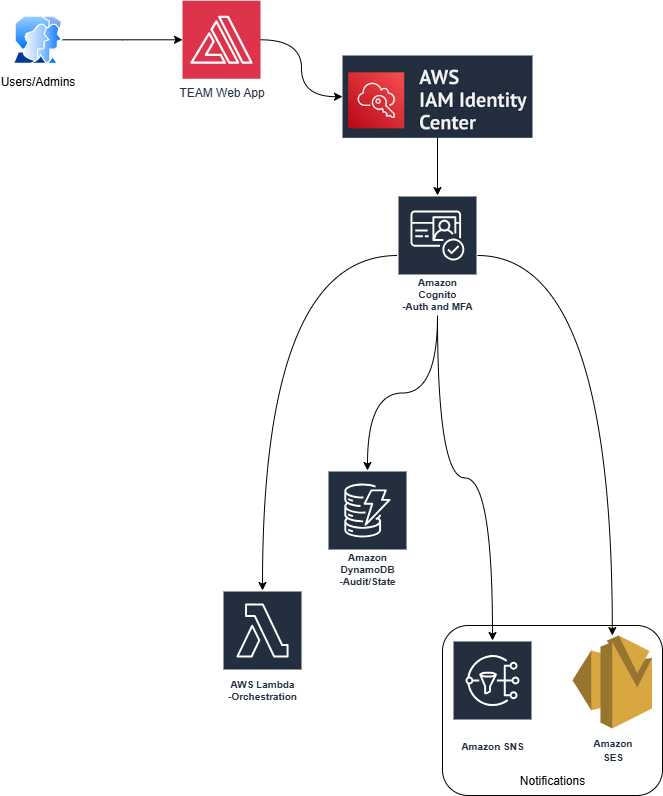
Key Components
| Component | Purpose |
|---|---|
| AWS IAM Identity Center | Your identity foundation - TEAM plugs into your existing setup |
| Amazon Cognito | Handles authentication, MFA, and group-based authorization |
| AWS Amplify | Hosts the web application (surprisingly polished UI) |
| AWS Lambda | Processes requests, approvals, and automatic revocations |
| Amazon DynamoDB | Stores requests, approvals, and audit history |
| Amazon SNS/SES | Sends notifications for requests, approvals, and session status |
Because it's fully serverless, TEAM costs very little to operate. You pay only for what you use, and there's no infrastructure to manage.
Key Features
Centralized Management Console
A single dashboard for creating, approving, managing, and monitoring all elevated access requests. Administrators get full visibility into who has access to what, and when.
Rich Authorization Model
TEAM uses Amazon Cognito group-based authorization and SAML integration with IAM Identity Center. You can define eligibility policies that control which users can request access to which accounts and permission sets.
Complete Audit Trail
Every action is logged:
- Who requested access and why
- Who approved (or denied) and when
- Session activity during the elevated access period
- Automatic correlation between justifications and actual actions
Your compliance and security teams will love this for audits.
TEAM's audit logs integrate with CloudTrail, allowing you to correlate elevated access sessions with the actual API calls made during that time period.
Automatic Notifications
TEAM keeps everyone informed:
- Requesters get notified when their request is approved or denied
- Approvers get notified of pending requests
- Users get reminded when their session is about to expire
Session Logging
With session logging enabled, you can see exactly what users did during their elevated access period. This makes it easy to correlate the stated justification ("debugging production issue") with actual activity.
Deployment
TEAM is designed for straightforward deployment via AWS Amplify. The high-level steps are:
- Prerequisites - Ensure you have IAM Identity Center configured in your management account
- Clone the repository - Get the code from GitHub
- Configure settings - Set up your identity provider integration and eligibility policies
- Deploy with Amplify - Follow the deployment guide to provision all resources
- Configure approvers - Define who can approve requests for which accounts
- Test the workflow - Walk through an end-to-end request/approval cycle
The TEAM documentation includes a comprehensive walkthrough that takes you through all the functionalities, from requesting access to auditing sessions.
Security Considerations
A few things to keep in mind:
- Keep TEAM updated - In September 2025, AWS issued a security bulletin (CVE-2025-1969) for an input validation issue. Always run the latest version (1.2.2 or newer)
- Limit eligibility - Don't make everyone eligible for admin access. Define granular eligibility policies
- Require strong justifications - Train users to provide meaningful justifications, not just "need access"
- Review session logs - Periodically audit what users actually did during elevated sessions
- Use short durations - Encourage users to request the minimum time needed
Alternative Approaches
TEAM isn't the only option for just-in-time access. AWS IAM Identity Center also integrates with AWS Security Competency partner solutions. If you're using Microsoft Entra (Azure AD), you can combine Entra PIM (Privileged Identity Management) with IAM Identity Center for a similar workflow.
The advantage of TEAM is that it's open source, free, and purpose-built for AWS. The disadvantage is that you're responsible for deployment and maintenance.
Use Cases
Production Break-Fix
Developer needs admin access to debug a production issue. They request 2 hours of access, provide the incident ticket number, and get approval from the on-call lead. Access auto-expires after the incident is resolved.
Quarterly Audits
Finance team needs read access to billing accounts for quarterly close. They request access for 3 days, and it automatically disappears after the audit period.
Contractor Access
External contractors need access to specific accounts for a project. Instead of permanent access, they request time-bound access with clear justifications and automatic expiration.
Security Investigations
Security team needs elevated access to investigate a potential incident. The request creates a clear audit trail of who accessed what during the investigation.
Troubleshooting
- User can't see accounts to request - Check eligibility policies in TEAM configuration. Verify the user is in the correct Cognito groups that grant eligibility.
- Approval notification not received - Verify SNS/SES is configured correctly. Check approver email addresses and spam folders. Review CloudWatch logs for Lambda errors.
- Access not granted after approval - Check Lambda execution logs for IAM Identity Center API errors. Verify TEAM has permissions to create permission set assignments.
- Access not revoked at expiration - Review the revocation Lambda function logs. Check for throttling on IAM Identity Center APIs if many sessions expire simultaneously.
- SAML integration errors - Verify the Cognito user pool is correctly federated with IAM Identity Center. Check attribute mappings match expected values.
- Amplify deployment fails - Ensure you have sufficient IAM permissions for Amplify deployment. Check CloudFormation stack events for specific error messages.
Conclusion
If you're using IAM Identity Center (and you should be), TEAM is worth serious consideration. It solves a real problem - permission sprawl and permanent elevated access - with a clean, auditable workflow.
The serverless architecture means it's cheap to run, and the open-source model means you can customize it for your needs. Yes, you'll need to maintain it yourself, but for most organizations, the security benefits far outweigh the operational overhead.
Start with the GitHub repository, walk through the deployment guide, and test it with a small group before rolling out organization-wide. Your security posture (and your auditors) will thank you.
Want Help With This?
If you're working on something similar and want a second set of eyes, or you'd like to talk through how this applies to your environment, reach out via the contact form. Happy to help.