Centralizing VPC endpoints in a hub VPC with Transit Gateway sounds appealing, but it's only cost-effective at scale. For 2-3 VPCs with fewer than 6 endpoint types, deploying endpoints in each VPC is ~3x cheaper. Centralization makes sense when you have 10+ VPCs or 10+ endpoint types. Don't forget: you must manually create Route 53 Private Hosted Zones for cross-VPC DNS resolution.
Introduction
When building multi-VPC architectures in AWS, you'll eventually face a decision: should you deploy VPC endpoints in every VPC, or centralize them in a shared services VPC? This post explores the architecture, implementation, cost trade-offs, and critical DNS considerations.
The Architecture
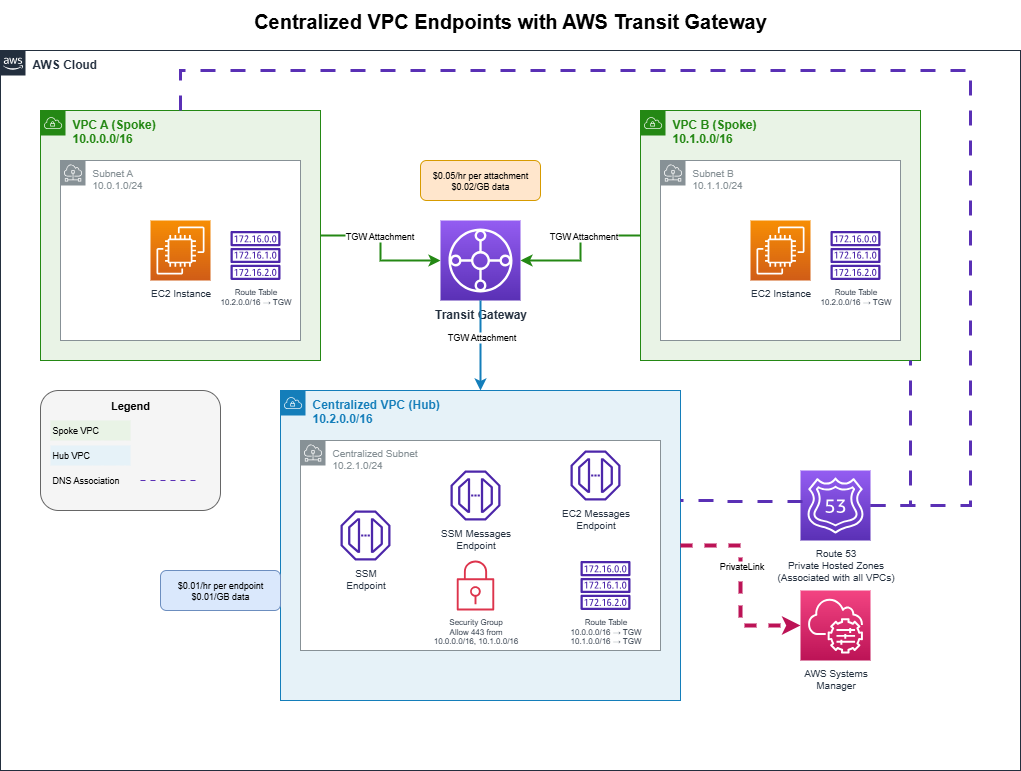
The centralized VPC endpoint pattern uses AWS Transit Gateway to share VPC endpoints across multiple VPCs:
Components
- Spoke VPCs (A & B): Workload VPCs where your EC2 instances run
- Hub VPC: Centralized VPC hosting the shared VPC endpoints
- Transit Gateway: Connects all VPCs and routes traffic between them
- VPC Endpoints: Interface endpoints for AWS services (SSM, SSM Messages, EC2 Messages)
- Route 53 Private Hosted Zones: Enable DNS resolution across all VPCs
The Terraform Implementation
VPCs and Subnets
Standard aws_vpc resources for hub and spokes, each with enable_dns_support and enable_dns_hostnames set to true. DNS hostnames are non-negotiable - if they're off, interface endpoint resolution silently breaks.
Transit Gateway, Routing, and Endpoints
A single aws_ec2_transit_gateway, then one aws_ec2_transit_gateway_vpc_attachment per VPC. Spoke route tables get a route pointing the hub CIDR (10.2.0.0/16) at the TGW; the hub route table gets one route per spoke CIDR pointing back at the TGW.
The interface endpoints in the hub VPC look like the standard aws_vpc_endpoint pattern with one critical change:
resource "aws_vpc_endpoint" "ssm" {
  vpc_endpoint_type   = "Interface"
  service_name        = "com.amazonaws.${var.region}.ssm"
  private_dns_enabled = false   # MUST be false when using manual PHZs
}
The endpoint security group needs ingress on 443 from every spoke CIDR. Easy to forget when adding a new spoke.
The DNS Problem (Critical!)
Here's where many implementations fail. When you create a VPC endpoint with private_dns_enabled = true, AWS automatically:
- Creates a Private Hosted Zone for the service domain
- Associates it only with the VPC where the endpoint lives
- Creates DNS records pointing to the endpoint's private IPs
Spoke VPCs don't have access to the auto-created PHZ. When an EC2 instance in VPC A tries to reach ssm.us-east-1.amazonaws.com, it resolves to the public AWS IP, not your private endpoint.
The Solution: Manual Private Hosted Zones
You must create Private Hosted Zones manually and associate them with all VPCs. Create an aws_route53_zone for each AWS service domain (e.g. ssm.us-east-1.amazonaws.com), include a vpc {} block for every VPC that needs resolution (hub + all spokes), then add an aws_route53_record with an alias pointing at aws_vpc_endpoint.<name>.dns_entry[0]. Repeat for every service endpoint type (ssm, ssmmessages, ec2messages, etc.) - this is the part that gets tedious at scale and is the real argument for centralizing only when you have many spokes.
Set private_dns_enabled = false on your endpoints when using manual PHZs to avoid conflicts.
| Setting | PHZ Created By | Associated VPCs | Visible in Console |
|---|---|---|---|
private_dns_enabled = true |
AWS (automatic) | Only endpoint's VPC | No |
| Manual PHZ | You (Terraform) | Any VPCs you specify | Yes |
Cost Analysis
Let's break down the real costs of this architecture.
AWS Pricing (us-east-1)
| Component | Per Hour | Per Month (730 hrs) |
|---|---|---|
| Interface VPC Endpoint | $0.01/endpoint/AZ | $7.30 |
| Transit Gateway Attachment | $0.05/attachment | $36.50 |
| TGW Data Processing | $0.02/GB | variable |
| Endpoint Data Processing | $0.01/GB | variable |
| Route 53 Private Hosted Zone | - | $0.50/zone |
| Route 53 DNS Queries (private) | - | FREE |
When using private_dns_enabled = true, AWS manages the PHZ automatically at no extra cost. When using manual PHZs (required for centralized architecture), you pay $0.50/month per zone.
Scenario: 2 Spoke VPCs, 3 Endpoints (SSM)
Centralized Approach
| Item | Calculation | Monthly Cost |
|---|---|---|
| 3 VPC Endpoints (hub only) | 3 x $7.30 | $21.90 |
| 3 TGW Attachments (A, B, hub) | 3 x $36.50 | $109.50 |
| 3 Route 53 PHZs (manual) | 3 x $0.50 | $1.50 |
| Fixed Total | $132.90 | |
| + TGW data processing | $0.02/GB | variable |
Distributed Approach (endpoints in each spoke VPC)
| Item | Calculation | Monthly Cost |
|---|---|---|
| 6 VPC Endpoints (3 per VPC x 2) | 6 x $7.30 | $43.80 |
| No Transit Gateway | $0 | $0 |
| Route 53 PHZs (auto-managed) | included | $0 |
| Fixed Total | $43.80 |
The Verdict
For 2 VPCs with 3 endpoints, the distributed approach is ~3x cheaper!
The centralized pattern saves money only when you have many VPCs or many endpoint types.
Break-Even Analysis
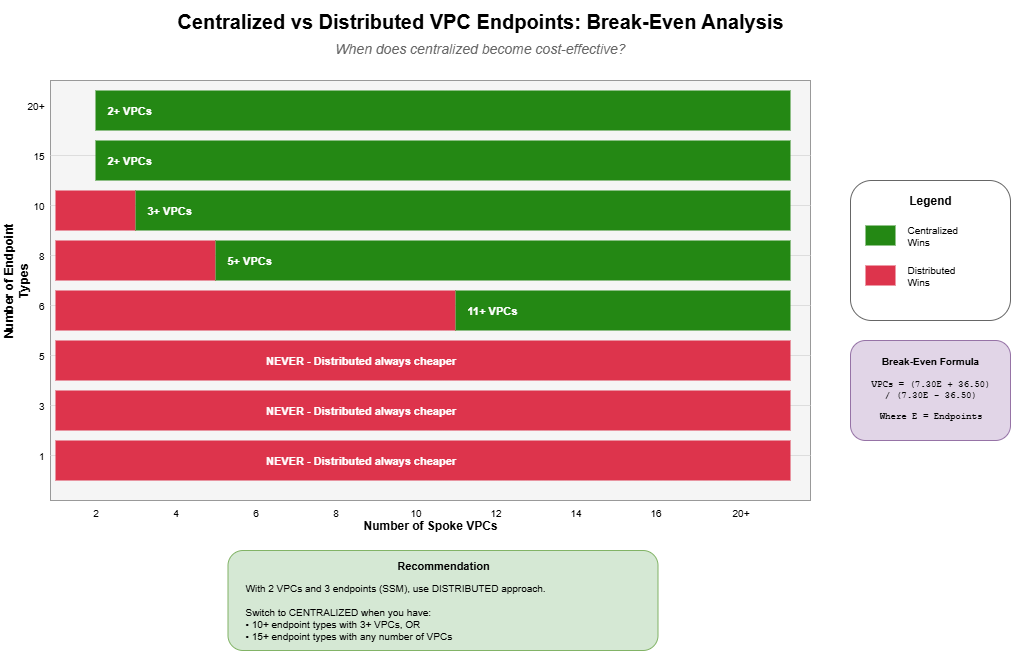
The break-even formula depends on both the number of VPCs (N) and endpoint types (E):
Break-even VPCs = (7.30E + 36.50) / (7.30E - 36.50)This only works when E > 5 (otherwise centralized is never cheaper on cost alone).
Break-Even Table
| Endpoint Types | VPCs Needed for Centralized to Win |
|---|---|
| 3 | Never (distributed always cheaper) |
| 5 | Never (break-even at infinity) |
| 6 | 11 VPCs |
| 8 | 5 VPCs |
| 10 | 3 VPCs |
| 15 | 2 VPCs |
| 20+ | 2 VPCs |
Data Processing Costs: A Real-World Example
Let's calculate data processing costs for a realistic scenario: SSM access to EC2 instances in each VPC, 5 times per day.
Estimating SSM Session Data
| Session Activity | Data |
|---|---|
| Connection handshake | ~50KB |
| Commands typed | ~1-2KB each |
| Output returned | ~1-5MB (varies) |
| Typical session total | ~5MB |
Monthly Data Cost Comparison
| Approach | Rate | Monthly Data | Data Cost |
|---|---|---|---|
| Centralized | $0.05/GB | 1.5GB | $0.075 |
| Distributed | $0.01/GB | 1.5GB | $0.015 |
Complete Monthly Cost (Fixed + Data)
| Component | Centralized | Distributed |
|---|---|---|
| VPC Endpoints | $21.90 | $43.80 |
| TGW Attachments | $109.50 | $0 |
| Route 53 PHZs | $1.50 | $0 |
| Data Processing | $0.08 | $0.02 |
| Total | $132.98 | $43.82 |
For typical SSM usage (5 sessions/day per VPC), data costs are negligible (~$0.08 vs $0.02 per month). Fixed costs dominate the bill entirely. You'd need ~18,000 GB/month of data transfer before data costs become significant.
Common VPC Endpoints
If you're considering centralization, here are endpoints you might add:
Gateway Endpoints (FREE)
- S3:
com.amazonaws.{region}.s3 - DynamoDB:
com.amazonaws.{region}.dynamodb
Interface Endpoints ($0.01/hr/AZ)
Compute & Containers: EC2, ECS, ECS Agent, ECS Telemetry, ECR API, ECR Docker, EKS, Lambda
Security & Identity: Secrets Manager, KMS, STS, IAM
Monitoring & Logging: CloudWatch Logs, CloudWatch Monitoring, X-Ray
Messaging: SNS, SQS, EventBridge, Step Functions
Common Combinations
| Use Case | Endpoints Needed |
|---|---|
| SSM Access | ssm, ssmmessages, ec2messages |
| ECS/Fargate | ecs, ecs-agent, ecs-telemetry, ecr.api, ecr.dkr, s3, logs |
| Lambda in VPC | lambda, sts, logs |
| Secrets + Encryption | secretsmanager, kms, sts |
When to Centralize
Centralize When:
- You have 10+ VPCs
- You need 10+ different endpoint types
- You want centralized security controls and logging
- You have a hub-and-spoke architecture already using Transit Gateway
- Operational simplicity outweighs cost
Distribute When:
- You have few VPCs (< 5)
- You need few endpoint types (< 6)
- Cost is the primary concern
- You want simpler DNS (auto private DNS works per-VPC)
- You want to avoid Transit Gateway complexity
Conclusion
The centralized VPC endpoint pattern is a powerful architecture for large-scale AWS deployments, but it's not always the most cost-effective choice. Before implementing:
- Count your VPCs and endpoints - Use the break-even formula
- Don't forget DNS - Manual Private Hosted Zones are required
- Consider operational benefits - Centralized management may justify higher costs
- Start distributed, centralize later - It's easier to consolidate than to distribute
The math is clear: for small deployments (2-3 VPCs, < 6 endpoint types), putting endpoints in each VPC is significantly cheaper. Centralization makes financial sense only at scale.
Want Help With This?
If you're working on something similar and want a second set of eyes, or you'd like to talk through how this applies to your environment, reach out via the contact form. Happy to help.